Your iPhone can do much more than calling, messaging, and browsing the web. With the right apps, it can become a powerful productivity tool, creative studio, navigation system, fitness companion, entertainment centre, and AI assistant.
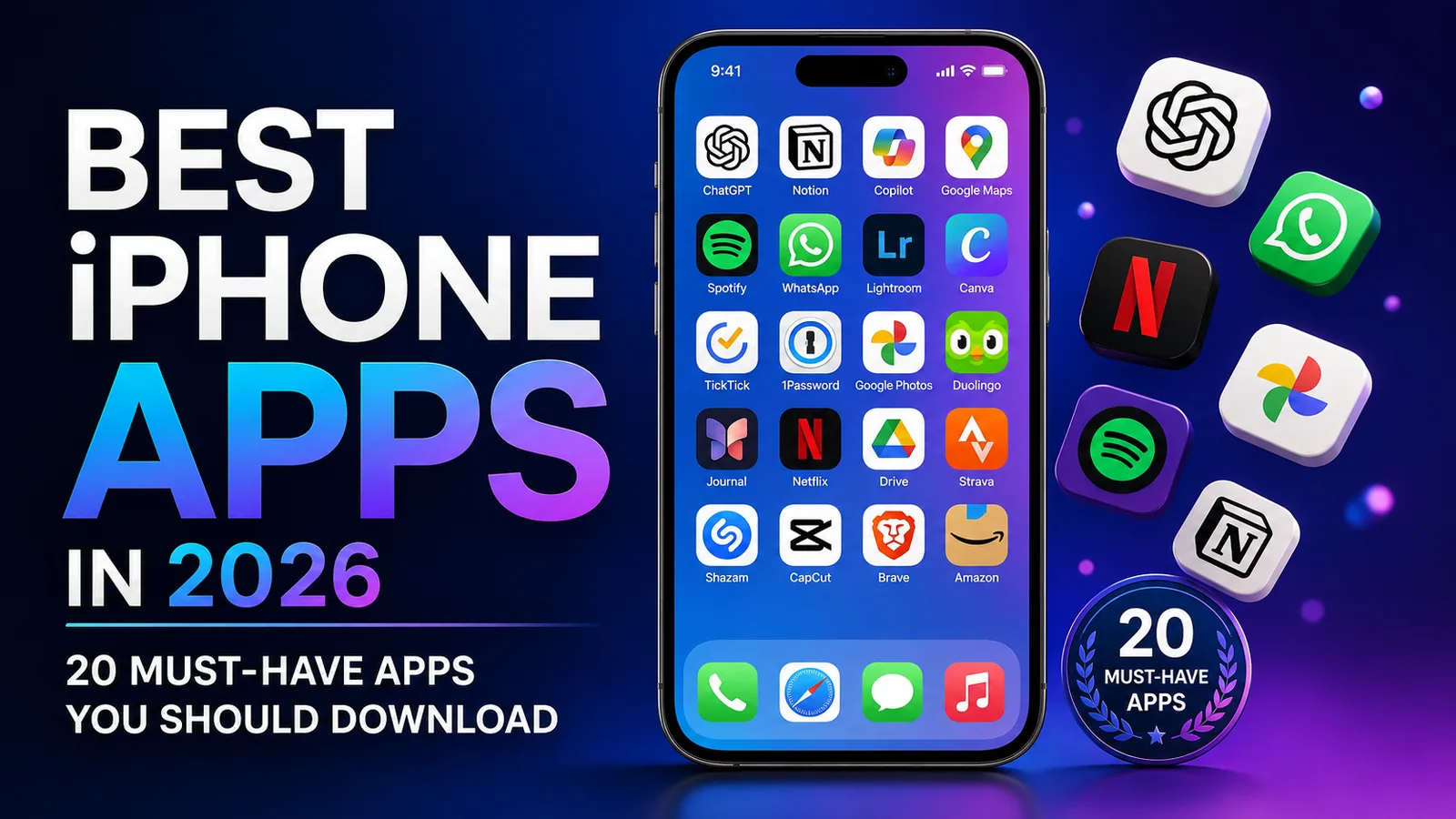
With so many apps available in the App Store, finding the ones that are actually worth installing can be difficult. To make things easier, we've selected 20 of the best iPhone apps to consider in 2026 based on usefulness, features, reliability, and overall value.
Note: App availability, features, subscriptions, pricing, and device compatibility may vary depending on your region and iPhone model.
1. ChatGPT
ChatGPT is one of the most versatile AI apps available for iPhone in 2026. It can help with writing, learning, brainstorming, coding, planning, research, image related tasks, and everyday questions through a conversational interface.
- AI powered conversations
- Writing and brainstorming assistance
- Advanced voice conversations
- Photo and image analysis
- Image generation
- Learning and technical assistance
2. Google Maps
Google Maps remains one of the best navigation apps available for iPhone. It combines GPS navigation, live traffic information, public transportation directions, offline maps, Street View, and information about millions of businesses and places.
- Turn by turn GPS navigation
- Live traffic and road information
- Public transit directions
- Offline maps
- Street View and Immersive View
- Business information, photos, and reviews
Get Google Maps on the App Store
3. Notion
Notion is an all in one productivity workspace that combines notes, tasks, documents, project management, databases, collaboration, and AI assisted features.
- Notes and documents
- Task and project management
- Custom databases
- Team collaboration
- AI assisted productivity tools
- Useful for personal and professional organization
4. Microsoft 365 Copilot
Microsoft 365 Copilot brings Microsoft's AI powered productivity tools to iPhone. It can help you create and summarize documents, draft content, analyze information, find files, brainstorm ideas, and work with Microsoft 365 services.
- AI powered productivity assistant
- Document creation and summarization
- Spreadsheet and information analysis
- Voice conversations
- Microsoft 365 integration
- File discovery and organization
Get Microsoft 365 Copilot on the App Store
5. Spotify
Spotify remains one of the leading apps for streaming music and podcasts. It offers an enormous library, personalized recommendations, playlists, podcasts, and support across many different devices.
- Millions of songs and podcasts
- Personalized recommendations
- Custom and curated playlists
- Cross device playback
- Offline listening with eligible Premium plans
- Audiobooks in supported regions
6. WhatsApp
WhatsApp remains one of the world's most widely used communication apps. It supports private messaging, voice calls, video calls, group conversations, communities, file sharing, and communication across multiple devices.
- End to end encrypted personal messages and calls
- Voice and video calling
- Group conversations
- Photo, video, and document sharing
- Communities and channels
- iPhone, iPad, Mac, and Apple Watch support
7. Adobe Lightroom
Adobe Lightroom is one of the best mobile photo editing apps for photographers, creators, and anyone who wants more control over their iPhone photos.
- Professional photo editing controls
- AI assisted editing tools
- RAW photo editing
- Quick Actions and presets
- Object and distraction removal tools
- Photo and video editing capabilities
Get Adobe Lightroom on the App Store
8. Canva
Canva makes it easy to create professional looking visual content directly from your iPhone. It is useful for social media posts, presentations, flyers, videos, thumbnails, resumes, marketing materials, and other designs.
- Thousands of customizable templates
- Photo editing tools
- Video creation and editing
- Social media design tools
- AI assisted creative features
- Easy collaboration and sharing
9. TickTick
TickTick is a powerful task manager for organizing work, personal projects, reminders, habits, and daily schedules from one app.
- Task lists and projects
- Multiple reminders
- Calendar views
- Recurring tasks
- Habit tracking
- Focus and Pomodoro timer
10. 1Password
1Password helps securely store and manage passwords, passkeys, payment information, secure notes, and other sensitive account information across your devices.
- Encrypted password vault
- Strong password generation
- Passkey support
- Autofill for apps and websites
- Cross device synchronization
- Secure sharing options
Get 1Password on the App Store
11. Google Photos
Google Photos provides an alternative way to back up, organize, search, edit, and share photos and videos from an iPhone, especially for people who use Google services across multiple devices.
- Photo and video cloud backup
- AI powered photo search
- Photo organization
- AI assisted editing tools
- Shared albums
- Google Lens integration
Note: Google Account storage is shared between services such as Google Photos, Gmail, and Google Drive.
Get Google Photos on the App Store
12. Duolingo
Duolingo makes learning languages easier by breaking lessons into short and interactive sessions. It is a convenient option for practicing speaking, listening, reading, and writing directly from an iPhone.
- More than 40 languages
- Short interactive lessons
- Speaking and listening practice
- Reading and writing exercises
- Progress tracking and daily goals
- Additional learning subjects in supported courses
13. Journal
Apple's Journal app provides a private and convenient way to record everyday moments, important events, thoughts, photos, videos, audio recordings, places, and other memories.
- Written journal entries
- Photos, videos, and audio recordings
- Journaling suggestions
- Multiple journals
- Insights and journaling streaks
- iCloud synchronization across supported Apple devices
14. Netflix
Netflix remains one of the leading entertainment apps for watching movies, series, documentaries, live events, and other streaming content from an iPhone or iPad.
- Movies and TV series
- Netflix original programming
- Personalized recommendations
- Downloads for offline viewing where supported
- Multiple profiles
- Additional entertainment including games and other content
Note: A Netflix membership is generally required to watch streaming content, and available content varies by region and plan.
15. Google Drive
Google Drive makes it easy to store, access, organize, scan, and share files from an iPhone. It is particularly useful for people who regularly work with Google Workspace services.
- Cloud file storage
- File and folder sharing
- Document scanning
- Offline file access
- Search and organization tools
- Google Workspace integration
Get Google Drive on the App Store
16. Strava
Strava is one of the most popular fitness tracking platforms for runners, cyclists, hikers, walkers, and other active users. It combines workout tracking with social and performance features.
- Running and cycling tracking
- Hiking, walking, and other activities
- More than 30 supported sport types
- Performance and activity history
- Social fitness community
- Apple Watch support
17. Shazam
Shazam is still one of the easiest ways to identify music playing around you. Let your iPhone listen for a few seconds and Shazam can usually identify the track, artist, and related music information.
- Fast song recognition
- Song and artist information
- Lyrics for supported songs
- Music discovery
- Apple Music integration
- Concert discovery features
18. CapCut
CapCut is a popular video editing app for creating social media videos, short form content, promotional clips, product videos, and other mobile video projects.
- Trim, split, and merge video clips
- Auto captions
- Text to speech tools
- Video stabilization
- Background removal
- Effects, filters, transitions, and templates
19. Brave Browser
Brave is a privacy focused web browser for iPhone that includes built in tools designed to reduce unwanted advertising and tracking while browsing the web.
- Built in ad blocking
- Tracker protection
- Private browsing features
- Brave Search integration
- Brave Leo AI assistant
- Optional VPN and additional privacy services
Get Brave Browser on the App Store
20. Amazon Shopping
The Amazon Shopping app makes it convenient to search for products, compare options, read customer reviews, place orders, and track deliveries directly from an iPhone.
- Product search and shopping
- Customer ratings and reviews
- Order and delivery tracking
- Price and availability information
- Barcode and visual product search
- Shopping lists and saved products
Get Amazon Shopping on the App Store
Best iPhone Apps by Category
If you do not need all 20 apps, start with the ones that best match how you use your iPhone:
- AI and Productivity: ChatGPT, Microsoft 365 Copilot, Notion
- Navigation: Google Maps
- Communication: WhatsApp
- Music: Spotify, Shazam
- Photo Editing: Adobe Lightroom
- Design: Canva
- Tasks and Organization: TickTick, Journal
- Password Security: 1Password
- Photos and Cloud Storage: Google Photos, Google Drive
- Learning: Duolingo
- Entertainment: Netflix
- Fitness: Strava
- Video Editing: CapCut
- Private Browsing: Brave Browser
- Shopping: Amazon Shopping
Honorable Mentions
There are many other excellent iPhone apps that may be worth installing depending on how you use your device. Some additional options include:
- Discord
- Signal
- Slack
- Trello
- Dropbox
- Kindle
- Proton Mail
- X
What to Check Before Installing iPhone Apps
Before installing an app on your iPhone, it is worth checking a few details on its App Store listing.
- Developer: Confirm that you are downloading the official app rather than a similarly named imitation.
- App Privacy: Review Apple's App Privacy section to understand the types of data the developer says the app may collect.
- Subscriptions: Check whether important features require a subscription or in app purchase.
- Compatibility: Make sure the app supports your version of iOS and iPhone model.
- Storage: Photo, video, AI, and streaming apps can consume significant storage over time.
- Permissions: Only grant access to your location, photos, microphone, camera, contacts, or other information when the feature requires it.
- Updates: Keeping apps updated can provide new features, security improvements, and bug fixes.
Frequently Asked Questions
What are the most useful iPhone apps in 2026?
The most useful apps depend on how you use your phone. ChatGPT is useful for AI assistance, Google Maps for navigation, Notion and TickTick for productivity, WhatsApp for communication, 1Password for password management, and Google Drive for cloud storage.
Are these iPhone apps free?
Many of the apps on this list are free to download, but some offer optional subscriptions or in app purchases. Services such as Netflix generally require a paid membership to access their main content.
What are the best productivity apps for iPhone?
Some of the strongest productivity options include ChatGPT, Notion, Microsoft 365 Copilot, TickTick, Google Drive, and 1Password.
What are the best iPhone apps for students?
Students may find ChatGPT, Notion, Google Drive, Duolingo, Canva, TickTick, and Microsoft 365 Copilot particularly useful for studying, organizing assignments, creating presentations, learning new skills, and managing projects.
What are the best creative apps for iPhone?
Adobe Lightroom is an excellent choice for photography, Canva works well for graphic design and social media content, while CapCut provides powerful mobile video editing tools.
Final Thoughts
The iPhone is capable of becoming much more useful when it is paired with the right apps. In 2026, AI assistants, productivity platforms, creative tools, communication apps, cloud services, fitness trackers, and entertainment platforms provide an enormous range of capabilities directly from your phone.
ChatGPT and Microsoft 365 Copilot are strong options for AI assistance, while Notion and TickTick can help with organization and productivity. Lightroom, Canva, and CapCut give creators powerful mobile tools, while Google Maps, WhatsApp, Spotify, Google Drive, and 1Password cover many everyday needs.
You certainly do not need every app on this list. Choose the applications that match your daily routine, remove apps you no longer use, review privacy and subscription information before installing, and always download apps from their official App Store listings.